Publora Free Plan Tested: 15 Posts a Month, and the Cheapest Real Tier Is $0.99
Affiliate disclosure: This article contains affiliate links. If you sign up through one of them, I may earn a commission. That does not change the price you pay.
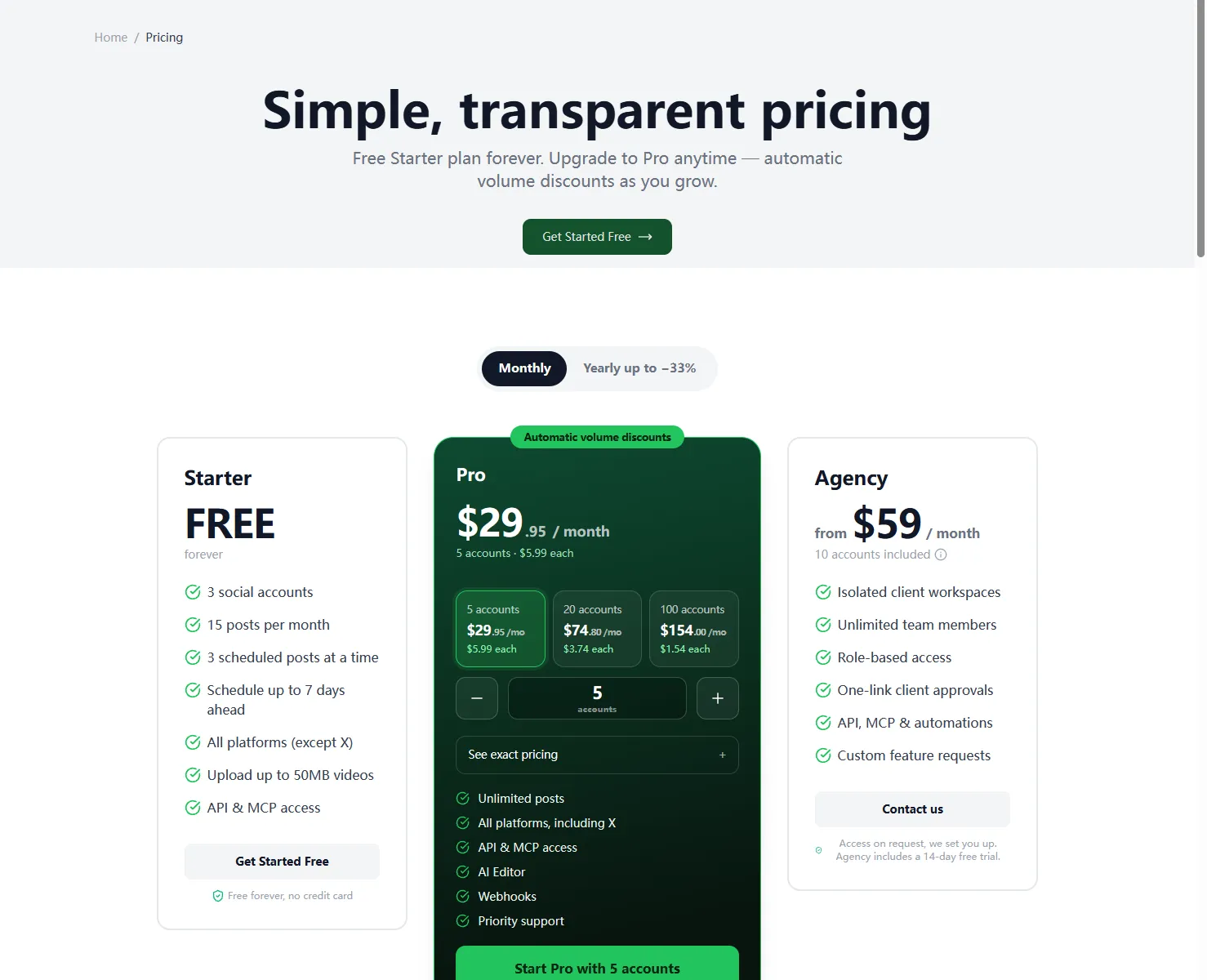
The short version: Publora's Starter plan is free forever, with three social accounts, 15 posts a month, up to three scheduled at once, scheduling up to seven days ahead, every supported platform except X, 50MB video uploads, and API plus MCP access included, with no credit card required.
What Publora is
Publora is a social media scheduling and publishing tool for running multiple accounts from one place. You line up posts in advance and let the tool publish them to your connected channels on schedule. The pitch is aimed squarely at small teams, creators, and cross-border sellers who are tired of opening five different apps to post the same update five times.
Signing up, step by step
I went through the signup myself rather than relying on the marketing page. From the homepage I clicked Get Started Free, which led to a registration form asking for an email address, a full name, and a password.
There was no confirmation email to wait for and no bot check to clear. Submitting the form put me straight into the dashboard. The new account showed Starter at 0/15 posts and 0/3 channels, which matches the advertised free allowance exactly.
That is the whole signup story. I did not connect any social accounts and I did not publish a post, so everything below about scheduling describes what the plan includes, not a campaign I ran.
If you want to check the free tier yourself, you can start on the free plan with an email address and a password.
What the free Starter plan actually includes
The homepage and the pricing page agree on the same set of numbers:
- Three social accounts, free forever.
- 15 posts per month.
- Up to three posts scheduled at the same time.
- Scheduling up to seven days in advance.
- All supported platforms except X.
- Video uploads up to 50MB.
- API and MCP access, with no credit card required.
The one limit worth reading twice is the platform list: everything except X. If X is the channel your audience lives on, the free plan does not cover it, and you should check whether a paid tier changes that before you build a workflow around it. For everyone else, three accounts and 15 posts a month is enough to keep a small presence moving.
How the pricing scales
Publora's paid tier is Pro, priced per account with the unit price dropping as you add more:
- 1 to 5 accounts: $5.99 per account.
- 6 to 20 accounts: $2.99 per account.
- 21 or more accounts: $0.99 per account.
Annual billing takes another 33% off those figures. There is also an Agency tier starting at $59 a month. The pricing page advertises a full refund on the first payment within seven days.
I clicked through the upgrade path with five accounts, chose annual billing, and reached the Stripe live-mode card form. The page showed ¥332.49 for the year, roughly $47.88, and let me switch between CNY and USD. I stopped there. No card details were entered and no payment was made, so I cannot tell you whether a charge will succeed with your particular card.
The affiliate program in one paragraph
Publora's program is hosted on Affonso, and it pays 30% recurring commission for life, not for a 12-month window. The cookie lasts 90 days, payouts start at $25 and are sent monthly through PayPal or Wise, and approval is instant. Self-referrals are not allowed, and there is a hold period before commissions clear, with refunds reversed against them. Promotion methods listed as allowed include websites, email, paid social, organic social, paid search, organic search, and mobile traffic. Brand bidding is explicitly not allowed, so paid search is fine but bidding on the brand name is not. My own payout setup was not finished because the tax and payment details were still pending.
The detail that separates it from Buffer and Hootsuite
The free plan includes API and MCP access. That is unusual for a scheduler at this price point, where an API is normally reserved for the upper tiers or sold as an add-on. If your workflow involves an AI assistant assembling and queueing posts, having MCP on the entry-level plan means you can experiment without first buying a seat. I am describing what is included on the plan, not claiming I built a specific integration; the run I did did not go beyond the account, pricing, and checkout screens.
Who it is for, and who it is not
It fits small teams and solo creators managing a handful of accounts who need a simple queue and do not want to pay for a scheduler before they know they will use it. It also fits anyone who wants to try scheduling from an AI assistant, because API and MCP are present on the free tier. Cross-border sellers will find the Stripe checkout straightforward, though the currency shown depends on where you are connecting from.
It is not for you if X is essential to your distribution, if you need more than 15 posts a month across more than three accounts without paying, or if you want to schedule further than seven days out on the free plan. And if you plan to drive paid search traffic as an affiliate, stay away from brand bidding.
Bottom line
The free plan is unusually generous for a multi-account scheduler: three accounts, 15 posts a month, seven-day scheduling, and API plus MCP access without a credit card. The paid side starts at $5.99 per account for small setups and falls to $0.99 at 21 accounts, with a further 33% off annually. My hands-on check covered signup, the free allowance, the pricing page, and the checkout form; I did not publish posts, connect channels, or pay for a plan.
If that matches what you need, start on the free plan and see whether the queue fits your workflow.