Let's Enhance Free Credits: 10 Images, One Watermarked Result
I signed up, confirmed my email, received 10 credits, and used one credit to upscale a 480 x 320 image to 1732 x 1155. The result was ready, but it carried a LetsEnhance watermark. No card was needed for the free credits. In my run, signup asked only for email and password, then the confirmation email link signed me in automatically. I saw no phone verification and no Turnstile challenge. Anything about paid downloads or billing beyond the visible page text is listed as untested below.
Free credits
The number that matters is 10. The signup page said I could start by processing 10 images, and the pricing page described the same allowance as 10 credits at registration, with no credit card required. The ratio is one image per credit, so the free allowance is not ten projects or ten downloads; it is ten single-image jobs.
After I clicked the confirmation link in the email, the site signed me in and the account showed 10 credits remaining. There was no card form in that path. I did not skip a payment screen or close a modal to reach the quota; the balance was there after email confirmation.
That is a clean free trial by my standard: I could create the account and see a usable balance before any payment step. It is also a small one. If you plan to test several settings on the same photo, ten credits can disappear quickly, because each run spends one credit. I spent one on my first job and the balance moved from 10 to 9. That change appeared in the account state, not just as a note on the result page.
What I did with the first credit
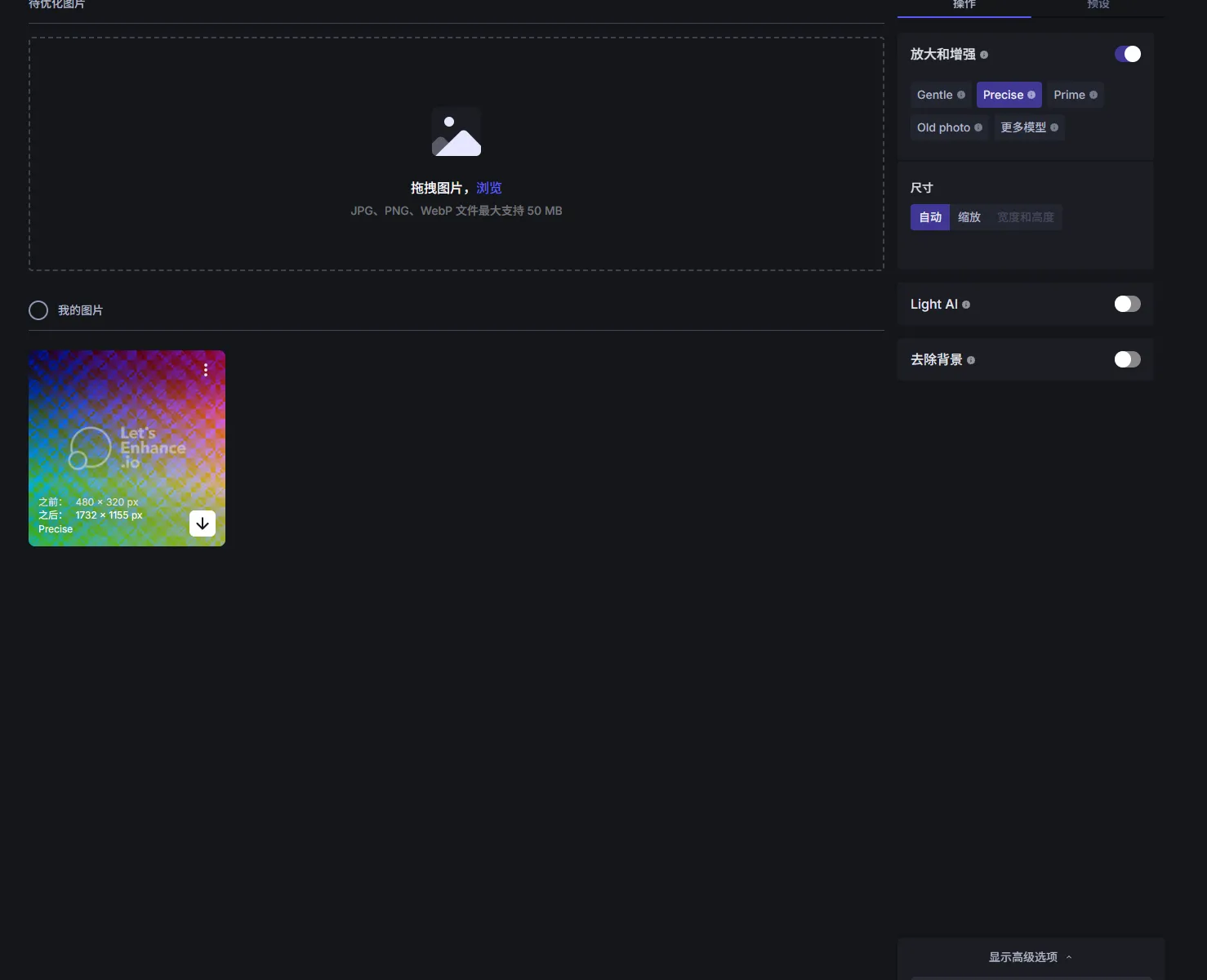
I uploaded a local PNG I generated for the test. Its size was 480 x 320 pixels, about 0.2 MP. The queue showed the file name and estimated the output at 1732 x 1155 pixels, about 2.1 MP. I then clicked the enhancement action. The balance changed from 10 to 9 at that point, and the image moved into the "my images" area with a processing message saying it would be ready in a few minutes.
I waited until the processing message disappeared. The result card then showed the before and after sizes side by side: 480 x 320 pixels before, 1732 x 1155 pixels after. The thumbnail had a LetsEnhance watermark over it. I did not change the output size by hand and I did not compare multiple enhancement modes, so I cannot say how other settings behave. What I can report is narrow and concrete: one small image went in, one larger image came out, and one credit was spent.
The workflow itself was simple. Email and password created the account; the email link completed sign-in; the upload control accepted the file; the enhancement button started the job; the result page showed the new dimensions. No phone number field appeared in the signup flow, and no bot check interrupted me. I am describing only what happened in this run, not promising the same path for every browser or region.
Watermark and download limits
The free result I saw was watermarked. That is the main limit of the free path. I did not find a way, and I did not try to force one, to remove the mark from the image produced with my free credit.
The pricing FAQ states that after payment a user can re-download a watermark-free version, including images that were processed with free credits. That is useful information, but it remains a page claim in my notes. I did not pay, so I did not see the clean download button, the re-download flow, or the final file without the mark. I am treating the FAQ wording as the published rule, not as a step I completed.
This distinction matters if your reason for trying the tool is to get a usable final asset today. A free credit buys a processed image with a visible watermark. If you need a clean export, the FAQ points to payment before re-download. If you only want to inspect the upscale, the watermarked result is enough to judge the size change and the general output.
Price tiers and payment
The pricing page listed three monthly subscription levels, each with two prices: an annual-billing rate and a higher month-to-month rate. Starter was $9 per month on annual billing, or $12 on monthly billing, for 100 credits. Pro was $24 annually or $32 monthly for 300 credits. Max was $34 annually or $45 monthly for 500 credits. A pay-as-you-go option also existed on the pricing page; I did not capture a price for it, so I will not guess one.
The payment method text named Stripe, with credit card or PayPal as the options shown. I entered no card details and made no payment. The page I saw had no phone number field. I also did not start the annual checkout separately from the monthly one, so I cannot describe the billing form beyond that summary.
For comparison, the free 10 credits are much smaller than the smallest listed paid bundle of 100 credits. At one image per credit, that is a ten-times jump in the number of jobs.
What I did not verify
Payment is the largest gap. I did not buy a plan, so card acceptance, PayPal flow, Stripe form fields, taxes, renewal behavior, and any regional card restriction are outside this write-up. I did not test a domestic card. I did not confirm whether a phone number is requested later in checkout; I only know that the page I inspected showed none.
Watermark-free re-download is also untested by me. The FAQ says it is available after payment, including for images processed with free credits, but I did not pay and therefore did not observe the clean file.
Image quality is another limit. I checked the result card dimensions, not fine detail, ringing, text sharpness, or how the output compares with other upscalers. One 480 x 320 PNG is not enough to make a quality claim.
On the partner side, the site describes an affiliate program at 20% recurring lifetime. My application status is Pending; I am waiting for the approval email. I have no approved terms from the portal and no promotional link to include here, so I am not adding one. No income claim follows from a program description, and none is made here.