Flixier Free Plan: 500 AI Credits, 10 Minutes of Export, and a Watermark
This article has no affiliate links yet. Flixier's partner program is application-based, and I have not been approved, so there is no referral link for me to give you. If that changes I will update this page and say so.
I opened Flixier on 2026-11-24 and walked the signup path end to end. The part I want to be upfront about: I could not finish an export, so everything below about export limits is the vendor's own wording, not a measurement I made. I will mark the difference every time it matters.
What opens before you have an account
editor.flixier.com/projects/create loads straight into a full editor. No login wall, no trial banner, no "start your free trial" button. The header shows the project name (Untitled, with a "click here to rename" hint), an Export button on the right, and a single Create account link in the middle.
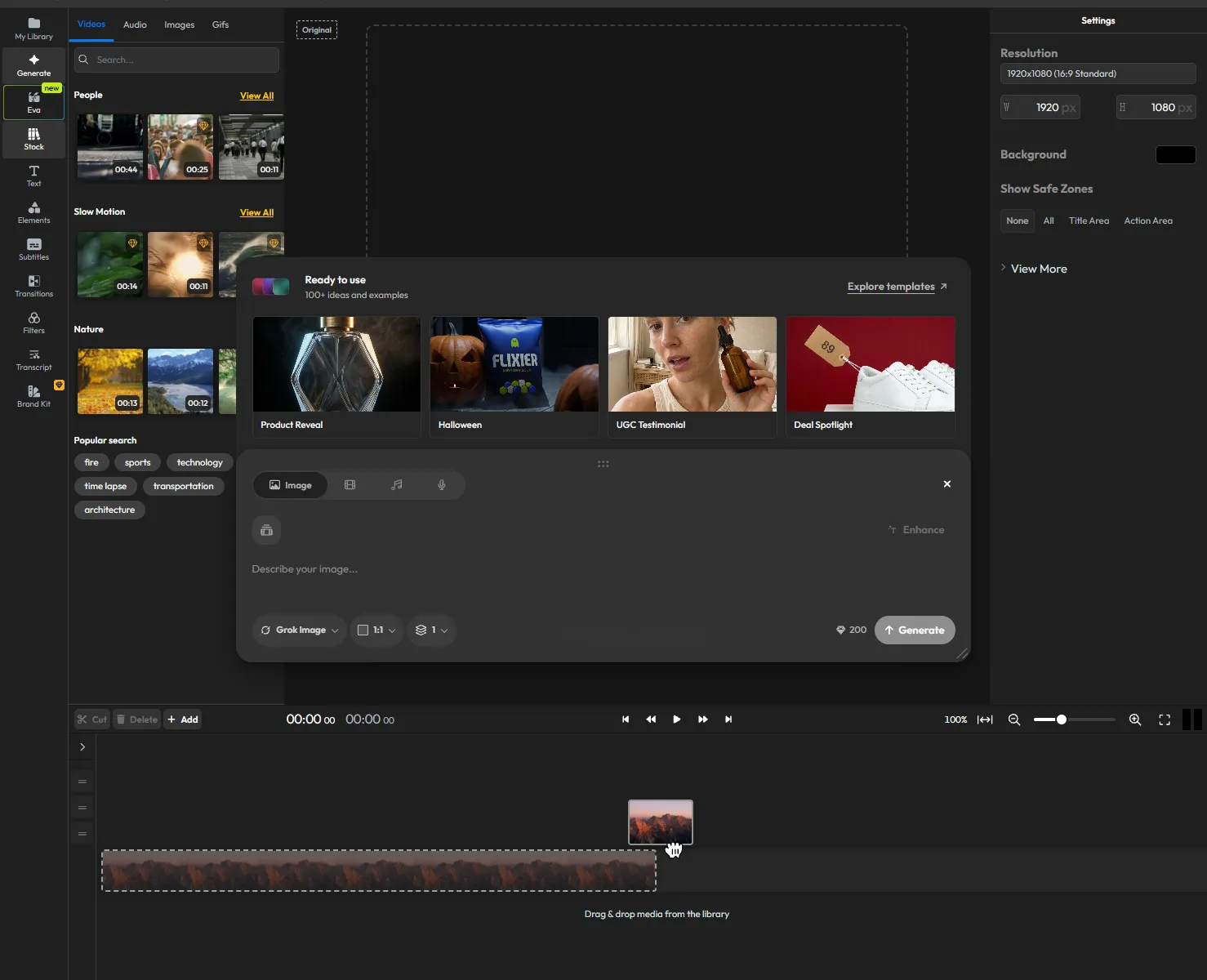
That is a different shape from most editors. You get the timeline, the stock library, Text, Elements, Subtitles, Transitions, Filters, Transcript and Brand Kit before you give anyone an email. The account exists to save the project and to export it, not to look at the tool.
For a Chinese reader that matters more than it sounds: a page that renders and behaves before signup is also a page that tells you whether the network route works, without spending an account first.
Signup is an email code, not a password
Clicking Create account opens a modal with three doors: Google, Facebook, or email. There is no password field anywhere in it.
I used the email door with a test address. The sequence was:
- Type the address, click
Create account. - The modal switches to a six-digit code field — placeholder
123456, six separate boxes. - The email arrives with subject "Flixier Verification Code".
- Paste the code; the button under the field reads
Continue with Login Code. - You land back in the editor, now with an avatar and an
Upgradebutton in the header.
No phone number, no card, no company name, no "tell us about your team". The whole account is an email and a code. If you are the kind of person who loses passwords, this is the feature, not a gap.
The watermark shows up before you export anything
The moment the account exists, a blue banner runs across the top of the editor:
Your exported video will include a watermark. This watermark can be removed at any stage by upgrading.
That is the free plan in one sentence, and Flixier puts it in the editor rather than hiding it in a pricing table. The Export panel repeats it in orange: "Your export will include a watermark".
The export panel itself is compact. Three output types (Video, Audio, GIF), a checkbox that is on by default ("Download immediately after export"), and a Publish to block offering YouTube, Facebook and Instagram — all three showed "Not connected" in my session. Nothing in the panel asks for a resolution; the free tier's ceiling is stated on the pricing page, not here.
What the pricing page actually grants
Pricing reads, for the Free tier: Try it free. No card needed. Then:
- 500 AI credits, included
- 10 minutes of video export per month
- 5 minutes of subtitles per month
- 720p resolution
- 2 GB storage
- limited stock library
- Flixier watermark
Starter is the first paid step: 2,000 credits, 60 minutes of export per seat per month, 1080p, 20 GB, no watermark. Creator jumps to unlimited exports, 4K, 250 GB and 10,000 credits. Business sits above that.
One number deserves attention because it is easy to misread. The 500 credits are not 500 generations. In the editor's AI generation panel, the model picker defaulted to Grok Image and the button carried a price tag of 200. Two hundred credits for one image. So the free allowance is closer to two AI images than to five hundred of anything.
The same panel gives a sense of scale for the expensive models: 4-second clips start at 2,500 credits (Kling O1) and run past 8,000 (Seedance). None of that fits inside a free account, which is the point — the credits are a sample, and the sample is small.
The pricing page changes currency based on where you are
This is the trap I would have fallen into as a buyer. My connection resolved to a Chinese address, and Flixier served the pricing page in Japanese yen: ¥3,099 / seat / month for Starter, ¥6,399 for Creator, ¥11,299 for Business. I checked the page source and found 24 references to JPY.
So the ¥ on that page is yen, roughly twenty dollars for Starter, not thirty hundred yuan. If you read it as RMB you will conclude the tool costs about ten times what it does and leave. Any price you see from a Chinese connection should be traced back to the currency code before you decide anything.
I did not enter checkout, so I cannot tell you whether a mainland card goes through, or whether the card form asks for a billing country that does not list China. Treat payment as untested.
What I could not verify
The honest gap: I did not complete an export.
Flixier's editor is a canvas application, and the automation I use could not move a stock clip from the library into the timeline. It clicked, it hovered, it dragged with both the framework's drag helper and a hand-written pointer sequence. The library item's own overlay kept intercepting the pointer, and the project duration stayed at 00:00:00. With an empty timeline, Export video does nothing — correctly, but that also means I never reached the step where the 720p ceiling or the watermark would show up in a real file.
So: the 10-minute monthly export allowance, the 720p cap and the watermark are reported from the vendor's pricing page and from the in-editor banner. They are not something I measured. If you need a hard number before you commit, do one export yourself — it costs nothing but a few minutes, and it is the only way to know whether the free tier is enough for your project.
Who this free tier fits
It fits a first-cut editor. Someone with a two-minute vertical clip, a subtitle track and a deadline this week can do the whole job inside the free plan and live with the watermark, or crop it out later.
It does not fit anything recurring. Ten minutes a month is one short video; a weekly publisher blows through it in the first week and then the banner makes sense. The AI credits are a demo, not a workflow — two images will not carry a thumbnail habit.
And for anyone outside the US, the pricing page's currency behaviour is the first thing to check, because a misread ¥ is a decision made on the wrong number.