Fliki Credit Math: What 3 Free Credits, $28 Standard and $88 Premium Actually Buy
Disclosure: This article contains an affiliate link. If you sign up through it, I may earn a commission. That does not change the price you pay.
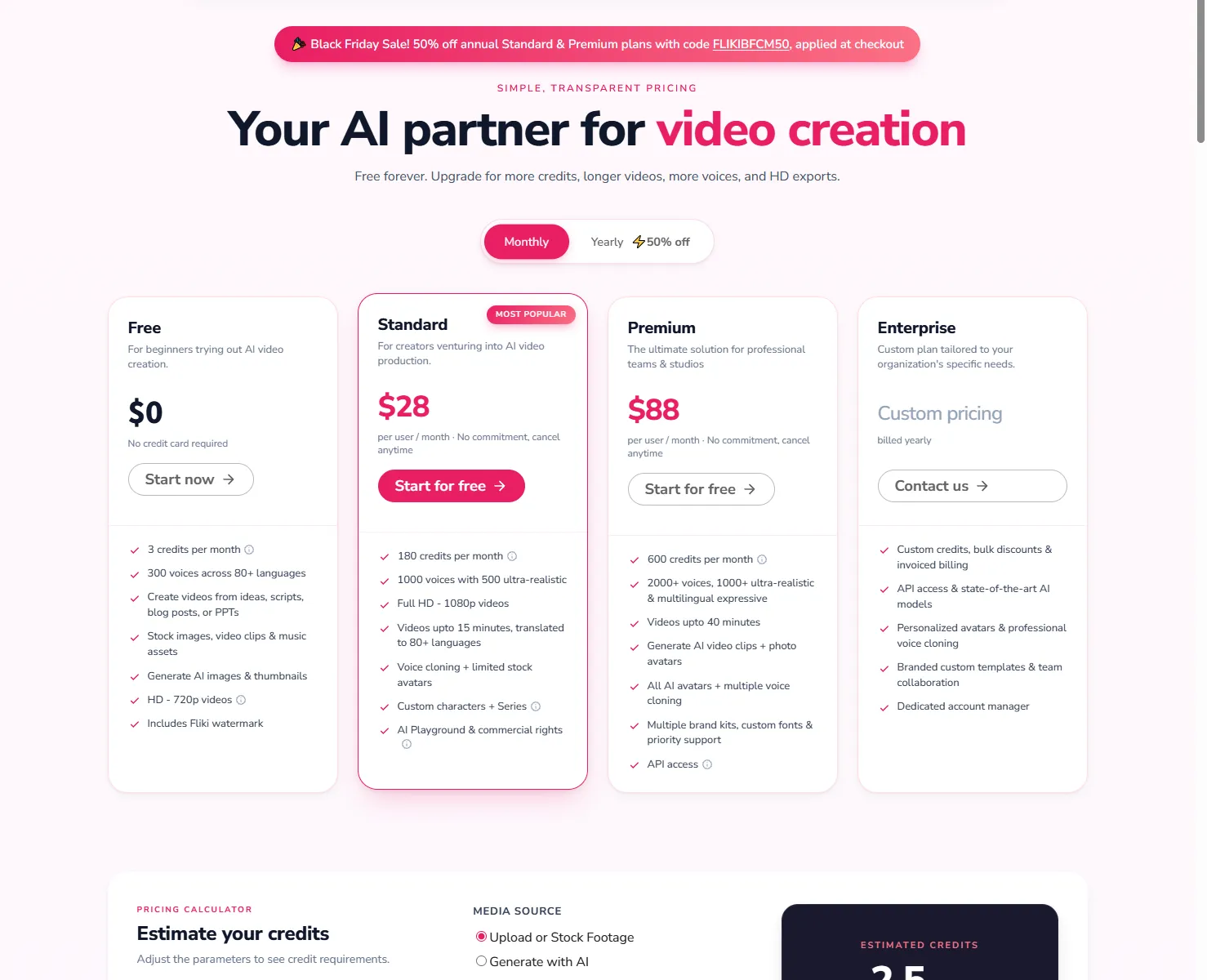
I rechecked Fliki's pricing page on 2026-11-25 and set it against the upgrade and checkout path I walked on 2026-11-22. The headline "3 credits per month" is real. What it does not say is that three credits are not three videos.
The number that decides everything
Fliki's own estimator uses 0.5 credits per minute. Three credits therefore cover about six minutes of generated audio or video, before edits. The free tier also caps a single export at 5 minutes. In practice you get one short video, not three monthly videos.
The pricing FAQ adds a second catch. If you change the script, the voice or the pauses, Fliki reprocesses the text and spends credits again. A script you polish four times can burn the whole allowance before you export anything.
What the free tier actually gives you
The page I checked on 2026-11-25 lists:
- 3 credits per month, no credit card required
- 300 voices across 80+ languages
- HD 720p video with the Fliki watermark
- 5 minutes maximum export length and 100 scenes
- Email-only support
The comparison table marks AI avatars, voice cloning, custom fonts, no watermark and commercial rights as unavailable on Free. So the free plan is good for testing whether a script sounds right. It is not a clean way to publish client work.
What Standard and Premium add
These amounts come from the in-app upgrade screen in my 2026-11-22 run; the pricing page text extraction on 2026-11-25 did not expose the numbers, so treat them as observed-at-checkout rather than a promise about today's promotion.
| Plan | Observed monthly price | Credits | Resolution | Export cap | Notable extras |
|---|---|---|---|---|---|
| Standard | $28 per user per month | 180 | 1080p | 15 minutes | 1,000 voices, voice cloning, commercial rights, 50 publications |
| Premium | $88 per user per month | 600 | 1080p | 40 minutes in the table | 2,000+ voices, API access, 3 brand kits, 120 publications |
There is a small inconsistency worth knowing. The 2026-11-25 comparison table says Premium exports up to 40 minutes, while the FAQ on the same page says 30 minutes. I did not pay for Premium, so I cannot settle it. Assume 30 minutes until a paid account shows otherwise.
The same page also advertises 50% off annual Standard and Premium with code FLIKIBFCM50 at checkout. That is a promotion, not the baseline price. Do not build a permanent budget around it.
What the checkout screen actually showed
From the 2026-11-22 run: clicking Upgrade, then Monthly, then Standard put me on a Stripe page. It showed $22.40 for the first month and $28 afterward. Because the browser session was in China, Stripe rendered CNY 155.55 for the first month and CNY 194.44 after, with an explicit 1 USD = 6.9442 CNY line. The card form accepted Visa, JCB, Mastercard, American Express, Diners Club and Discover, plus Apple Pay and Link.
I stopped at the card form. No card was entered, no subscription was created and no tax form was signed. The dollar amounts above are the plan prices; the yuan amounts are what that specific Stripe session displayed.
How I would do the math
Take your monthly minutes and divide by two to get credits, then add a buffer for rewrites. A single 10-minute video needs about 5 credits, which is already more than Free. A weekly 5-minute video needs roughly 10 credits a month, so Standard's 180 credits is far more than enough for that cadence. Premium only starts to make sense when you need the API, multiple brand kits or long-form exports.
If all you want is a voiceover for one short clip, the free tier plus a careful script is enough. If you need 1080p, commercial rights or a repeatable publishing workflow, the $28 tier is the first honest comparison point.
What I did not verify
- Actual file download. The Download voiceover button was covered by a paragraph element and my click timed out. Generation succeeded; download did not.
- Payment success. I stopped at Stripe's card form.
- Payouts and tax details. I joined the affiliate portal and confirmed my email, but I left the Wise address blank and did not submit tax information.
The affiliate program itself was instant on 2026-11-22: after email confirmation the dashboard showed a 30% commission link. I used that Fliki link for this write-up.
Bottom line
Fliki Free is six minutes of raw generation with a five-minute export ceiling and a watermark. Standard is the first tier that removes the practical publishing limits, and Premium is a workflow and API upgrade rather than a better deal for one video. Run the credit math before you click Upgrade.
If the numbers still work for you, you can start from Fliki.