Durable Free Plan: A Real Website in Four Minutes, and a Paywall at Publish
This article has no affiliate links yet. Durable's partner program is application-based, and I have not been approved, so there is no referral link to hand you. If that changes, I will update this page and say so.
I built a site on Durable on 2026-11-24, from a blank signup to a preview page anyone can open. The short version is better than most "AI website builder" promises: the generated site was genuinely usable, the whole build took about four minutes, and no card was asked for. The catch is one button further along, and it is not in the onboarding.
Signup: an email and six digits
durable.co redirects to durable.com. The header button is Start for free, which lands on /sign-up with the promise "Build in 30 seconds. No credit card required" and three doors: Google, Apple, email.
I used email. The form has exactly one field. No password, no confirmation, no "at least eight characters, one symbol". Submit it and you get a six-digit code by email ("569414 is your verification code" in my case). The code page uses six individual boxes; typing the sixth digit submits automatically and shows "Checking your code…".
That is the whole account creation. No phone, no card, no tax details, no team name — even though Durable's own product has a team concept, it is not part of signup.
The onboarding is a conversation, not a form
After the code, you land on /b/onboarding and meet Dru, an animated assistant that asks one question at a time:
- "Can you describe your business? You can drop in any links or images that will help."
- Business name.
- Website language.
- Phone number — with a
Skip for nowescape. - "Where did you hear about us?" (chips: friend, Facebook, X, Instagram, YouTube, Reddit, AI assistant, Google, other).
- "How should your new site look?"
- "Start building, or ask a few quick questions first?"
Two of those are worth flagging.
The language question is the one that will bite a Chinese user. My connection resolved to a Chinese address, and Durable opened with the language choice pre-set to Japanese, offering Japanese / English / Other. Nothing in the UI said "we guessed"; the step simply presented Japanese first. If you click through without reading, you get a Japanese site and have to regenerate. The URL carries it too — my onboarding link ended with languageOffer=ja. Choose English deliberately.
The phone step is optional and should be skipped for a test run. Filling it puts a number on a public page.
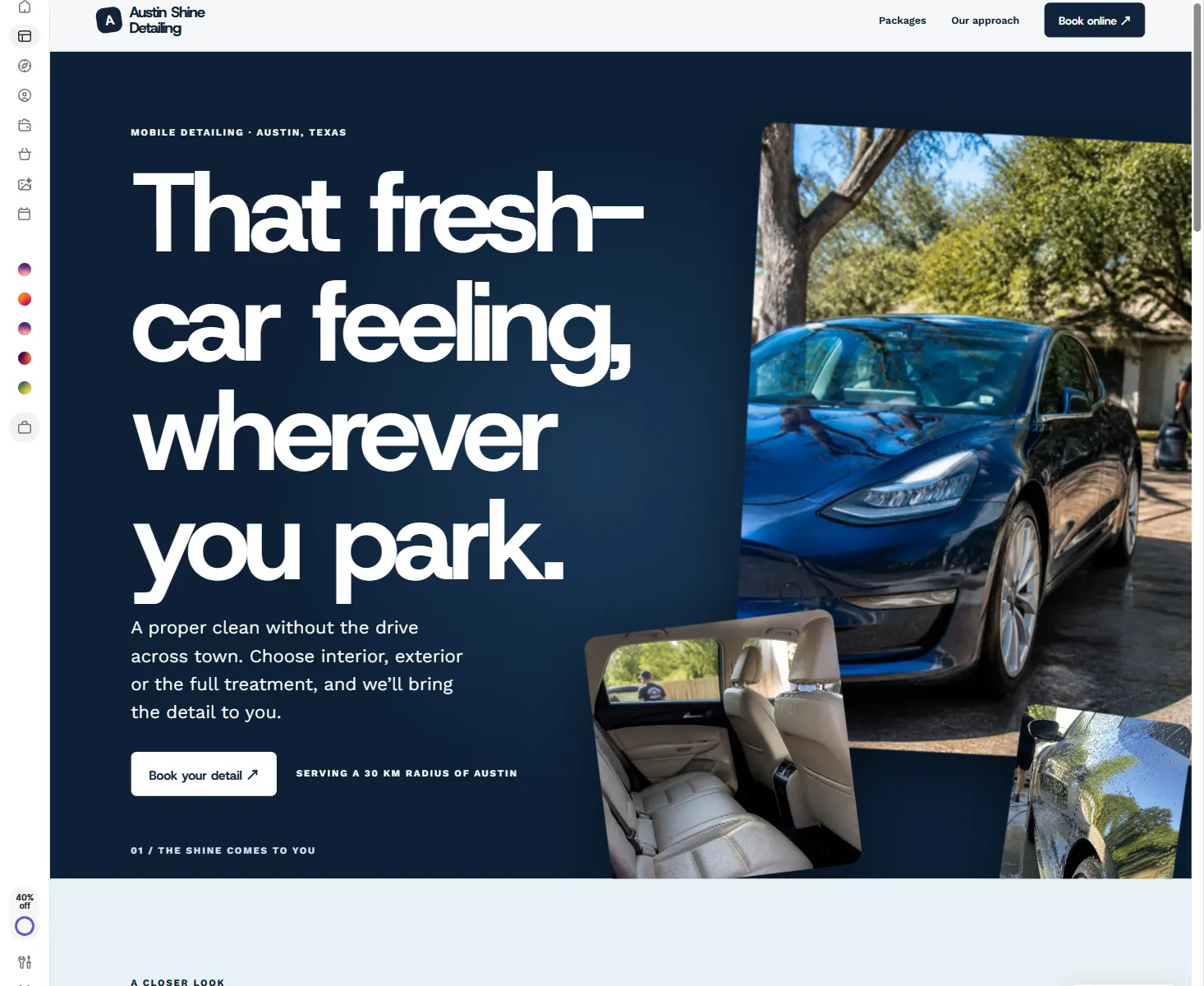
Then it asks how the site should look, you can paste a reference URL or describe it in a sentence. I wrote: clean and modern, dark blue accents, large hero photo of a freshly detailed car, three pricing cards, one-page layout with a booking button. It came back with "Start building" or "Sure, ask away" — I picked building, and that was the last question.
The build: three designs in about a minute
Durable generates three design directions first. Each comes with a one-line personality description ("playful", "quiet and spacious"), and a single question: "Which design's look and feel feels most like Austin Shine Detailing? You can choose one from the designs, or we can try a different direction."
I picked Design 1. Then the real build started, shown as a nine-step pipeline: planning pages, designing, choosing colours and fonts, adding photos, building pages, polishing, setting up the web address. Each step reported its own progress and time; step one said Step 1 of 9 · 36s. The whole run finished in roughly three to four minutes.
The output was a three-page site — Home, Packages, Our approach — with a hero headline, a package section, a footer, and a Book online button. It also picked commercial stock photography on its own, which for a first draft is the difference between "a template with lorem ipsum" and "something you can show someone".
The free plan is a preview, not a website
This is the part worth reading twice. Everything above happened on the $0 plan. What you get is:
- a website preview on a
*.durable.sitesubdomain - 300 AI credits, total (not per month)
- up to 10 CRM customers
- basic help centre support
- no custom domain, no publishing, no advanced SEO/GEO, none of the AI agent tools
Hitting Publish in the editor does not publish. It opens a plan wall: "Your site is ready to publish. Pick a plan to go live in seconds." Underneath, the three things paid plans add — your own domain, getting found on Google and ChatGPT, capturing leads and bookings — are listed as the reason to pay, plus a Publish my website button that is really a checkout button.
The interesting detail is what the preview already does. The preview URL opens without any login, in a clean browser profile, and my subdomain rendered the finished site with a thin banner across the top: "Preview mode · this website isn't live yet". So the free tier is not a sandbox — it is a public page with a disclaimer. Anyone with the link can read it. That is useful for feedback and awkward if you assumed "not published" meant "not visible".
Paid tiers, from the pricing page: Launch at $25/month ($22 if billed yearly) adds the custom domain, bookings, AI agents and 1,000 credits a month; Grow at $49/month ($41 yearly) adds unlimited users and 4,000 credits. Durable also prints "4.8 stars on Trustpilot" and "3,000,000+ businesses" on that page.
What I did not verify
- Checkout. I did not enter a card. Whether a mainland Chinese card goes through, and whether the billing country list includes China, is untested. Given the product is squarely aimed at US small businesses (the onboarding examples are plumbers, cleaners, landscapers), I would not assume it works.
- Custom domain. Not reached, because it is behind the plan wall.
- AI credits in practice. The free allowance is 300 credits total. I did not burn any, so I cannot say what one blog post or one image costs.
- Whether the preview subdomain expires. Nothing in the UI said. It is alive as of this run.
Who this fits
If you need to see an AI-built site for your business — to judge whether the direction is worth paying for — Durable's free plan is the cheapest way to find out, and the four-minute build is real. Read the preview with a critical eye, then decide.
If you need a live website today with your own domain, the free plan will not get you there, and the $22–25/month step is not a small one for someone testing an idea. Two other things to plan for: the language question defaults to Japanese for a Chinese connection, and the "preview" page you share is public.