Cal.com Free Plan Tested: What You Actually Get (and What's Locked Behind Teams)
Evidence note: this article is based on a real signup and hands-on session on 22 November 2026, recorded step by step in an internal run log. No subscription was made, no payment was sent, and no card details were entered. Everything after the Teams upgrade screen is unverified here.
The short answer
Cal.com's free plan is enough to go from signup to a live booking page with your own event types, but white-label branding, round-robin and collective bookings, templates, analytics, routing forms and custom APIs sit behind the Teams plan.
What was actually tested
The session used a real email signup, real email verification, a completed onboarding, a newly created event type and the resulting public booking page. Two later steps reached the pricing page and the Teams checkout form, then stopped before any card data was entered. No Teams features were used, so this is a report on the free tier and the upgrade gate, not a review of paid-only functionality.
One detail matters for reproducibility: the first signup attempt was stopped by the Turnstile human check twice. A second attempt in a different browser profile passed the check with a single click. That is a browser-state observation, not a claim that Cal.com's signup is broken.
Signup: email, password, then verify
The signup form offered email plus password; the alternatives shown were Google, Microsoft and SAML. The test account used a username, an email address and a password. The homepage had already stated: "Sign up with email. No credit card required."
After the second attempt cleared Turnstile, submission redirected to an email verification screen. A verification email arrived with both a numeric code and a verification link. Opening the link moved the account into onboarding.
Onboarding took three steps in the test:
- Choose personal use on the free plan.
- Set a display name and a short link, here
cal.com/links-pen-cal-r2. - Skip calendar connection; Cal Video remained the default.
Updated terms (ToS, DPA and SCC) were accepted during the flow. After that, the dashboard was reachable at /links.
What the free plan really does
The account already had three default event types: a 15-minute meeting, a 30-minute meeting and a confidential meeting, all under the new short link.
A fourth event was then created from scratch with a custom title, slug lp-test, a 15-minute duration, and assigned to "for myself". Creation succeeded and redirected to the event's own settings page.
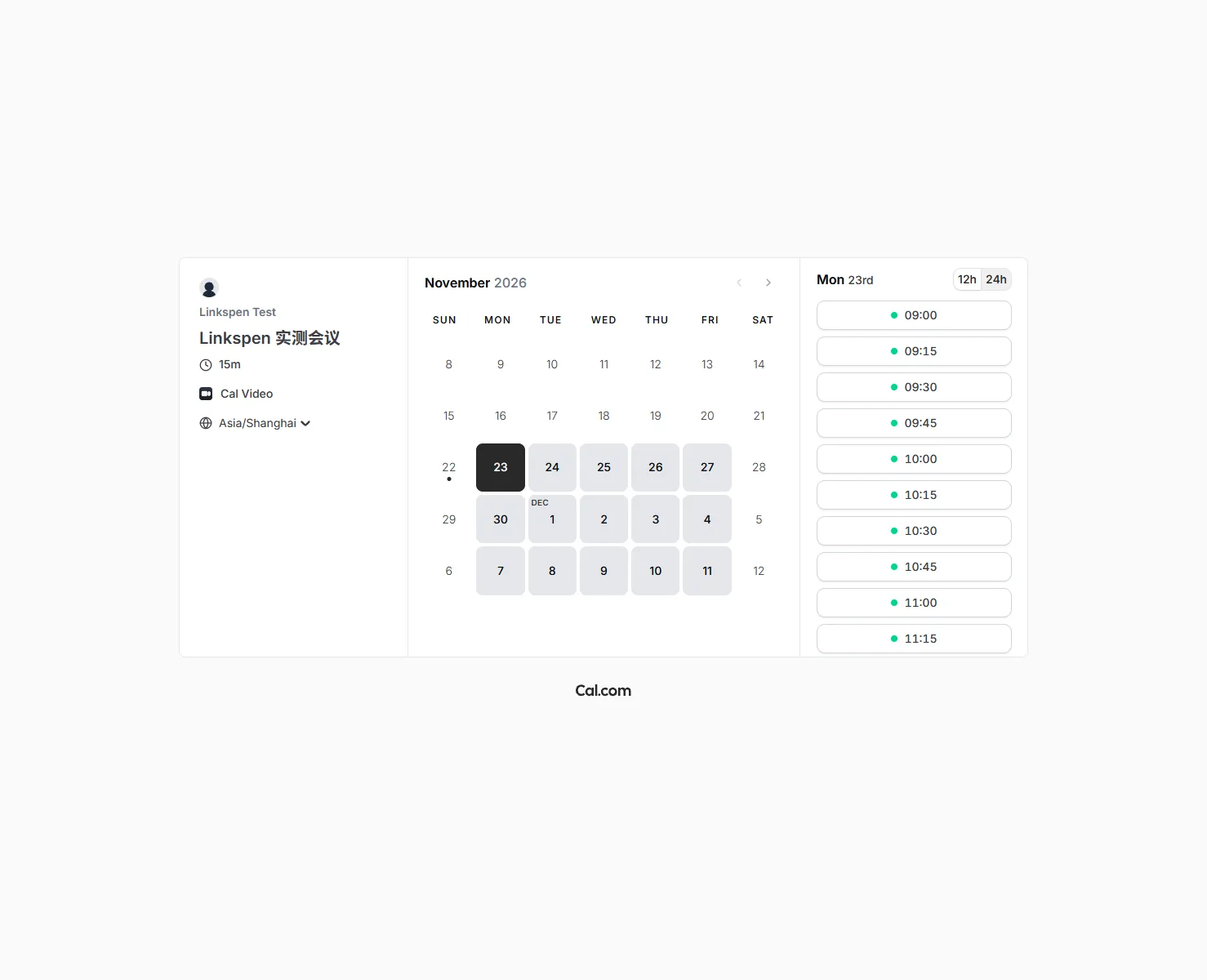
The public booking page at cal.com/links-pen-cal-r2/lp-test rendered normally. It listed bookable slots starting 23 November and auto-detected the viewer's timezone as Asia/Shanghai in the test environment. No booking was submitted, so the checkout-after-booking flow was not exercised.
That is the practical free core: account, short link, multiple event types, a public page with selectable times. For one person publishing a simple meeting link, nothing in this session required a card.
Where the free tier stops
Inside the new-event dialog, three options carried an upgrade badge: round-robin, collective mode and templates. Only the "for myself" path was available without upgrading.
The pricing page's feature breakdown added the billing-side evidence. "Remove Cal.com branding" appeared in the same Teams column as Round-robin, Managed and collective links, Recurring events, Routing forms, Booking analytics and Custom APIs. The page also showed Teams as the lowest paid tier above Individual Free.
Earlier in the same session, the feature breakdown was read before signup: free did not include workflows, Insights-analytics, round-robin, recurring events or webhooks; those were listed as paid-tier items. The free tier itself was listed at $0 with one user, unlimited links and calendars, and the ability to accept Stripe or PayPal payments. Payment collection was not configured or tested in this account.
The branding watermark
The public booking page kept Cal's branding at the bottom. In the test it appeared as an image link pointing to go.cal.com/booking, not as body copy saying "Powered by". If removing that mark matters for a client-facing page, it is a Teams item according to the pricing breakdown; the free page tested here did not remove it.
Pricing and checkout, as observed
Cal.com's public pricing page listed Teams at $12 per user per month billed annually, marked as saving 25%, and $16 per user per month when billed monthly. Organizations was listed at $28 annually and $37 monthly. Paid tiers showed a 14-day trial.
The upgrade path was then followed: on the logged-in account, Teams "Try for free" opened the team creation wizard. After step one (team name and slug), the browser went directly to a Stripe checkout page. It showed a Team Plan with 14 days free, then ¥111.11 per month (¥999.97 billed annually), with ¥0 due today. The email field was prefilled with the signup address.
The Stripe form listed Visa, JCB, Mastercard, Amex, Diners Club and Discover. Billing country defaulted to Japan and could be changed. No phone number was requested at that screen. The page applied a rate close to 1 USD = 6.9442 CNY, which is why the localized yuan amount differs from the dollar list price.
The session stopped at the card form. No card number, expiry, security code or cardholder name was entered; no subscription, trial activation, tax form or payment occurred. Earlier confusion in the first round about a 404 at /checkout was resolved: the real entry point is the team creation wizard, not a direct /checkout URL.
Affiliate program, background only
Cal.com has an affiliate program listed at 20% recurring for 12 months, with a 20% discount for the referred customer over the same period. The entry point requires login and an application, and the program page says every application is reviewed; no instant referral link was exposed in this test. The terms, dated 13 January 2026, require prior approval and restrict promotion to approved sites, blogs, long-form content, organic social and email; coupon or deal sites, paid advertising and discount-focused SEO are prohibited. No application was submitted during this test, and no referral link was used, so treat this only as context about the program's rules.
Who should use the free plan
- Solo developers and freelancers who need one clean booking link, a handful of event types and a public page with time slots.
- Anyone validating whether a scheduling tool fits their workflow before committing to a paid plan.
- Small setups where Cal's logo on the booking page is acceptable.
Who will outgrow it
- Teams that need round-robin assignment, collective bookings, routing forms or recurring events.
- Anyone who needs a white-label booking page without Cal branding.
- Users who depend on booking analytics, workflows, webhooks or custom APIs.
Verdict
For a single person, the free plan tested here completed the whole path from registration to a working public booking page without asking for a card. The real cost appears when branding, team routing and analytics become requirements; those are consistently grouped under Teams on the pricing page and inside the event-creation dialog. This article does not claim that paid features were tried, because the test stopped at the Stripe form with nothing paid.