AVCLabs Tested: 20 Free Credits and a 2x Web Upscale
Disclosure first: I saw AVCLabs' 30% affiliate terms, but because the application form required a mobile number and I did not submit it, this post contains no promotional or affiliate links.
Evidence note: one hands-on session on 22 November 2026, recorded in an internal run log with screenshots. I stopped before paying and before completing the affiliate application.
What AVCLabs is
AVCLabs offers desktop products for Windows and Mac, including Video Enhancer AI, Video Blur AI, Photo Enhancer AI, PhotoPro AI and Any Video Converter. It also offers web tools; the online editor lists AI Video Enhancer and Background Remover among others.
I used only the web route. No desktop client was installed, yet the browser was enough to sign up, upload, enhance and download. Local batch and offline desktop processing belong to the client path and were not tested. My claim is narrow: one small clip went in, one larger file came out, and I checked the file locally.
Signup and the free credits
Signup was self-serve. From the online editor, I opened Login / Sign Up, chose Sign Up, entered an email address and password, and submitted. The first password was rejected with "Please enter a password of 8 to 16 characters." I changed it to 13 characters and submitted again.
Two messages arrived: "AVCLabs Account Registration Confirmation Required" and "Welcome to AVCLabs." The activation link led to a registration-successful page with "Welcome Gift: 20 Free Credits!", "Export up to 20 times, entirely free" and "Enjoy watermark-free content for all exports."
I returned to the online editor, logged in, and saw the successful-login message and an account avatar. No card was requested at signup, and no mobile number was requested. The account was active before any paid plan was selected.
What I actually enhanced
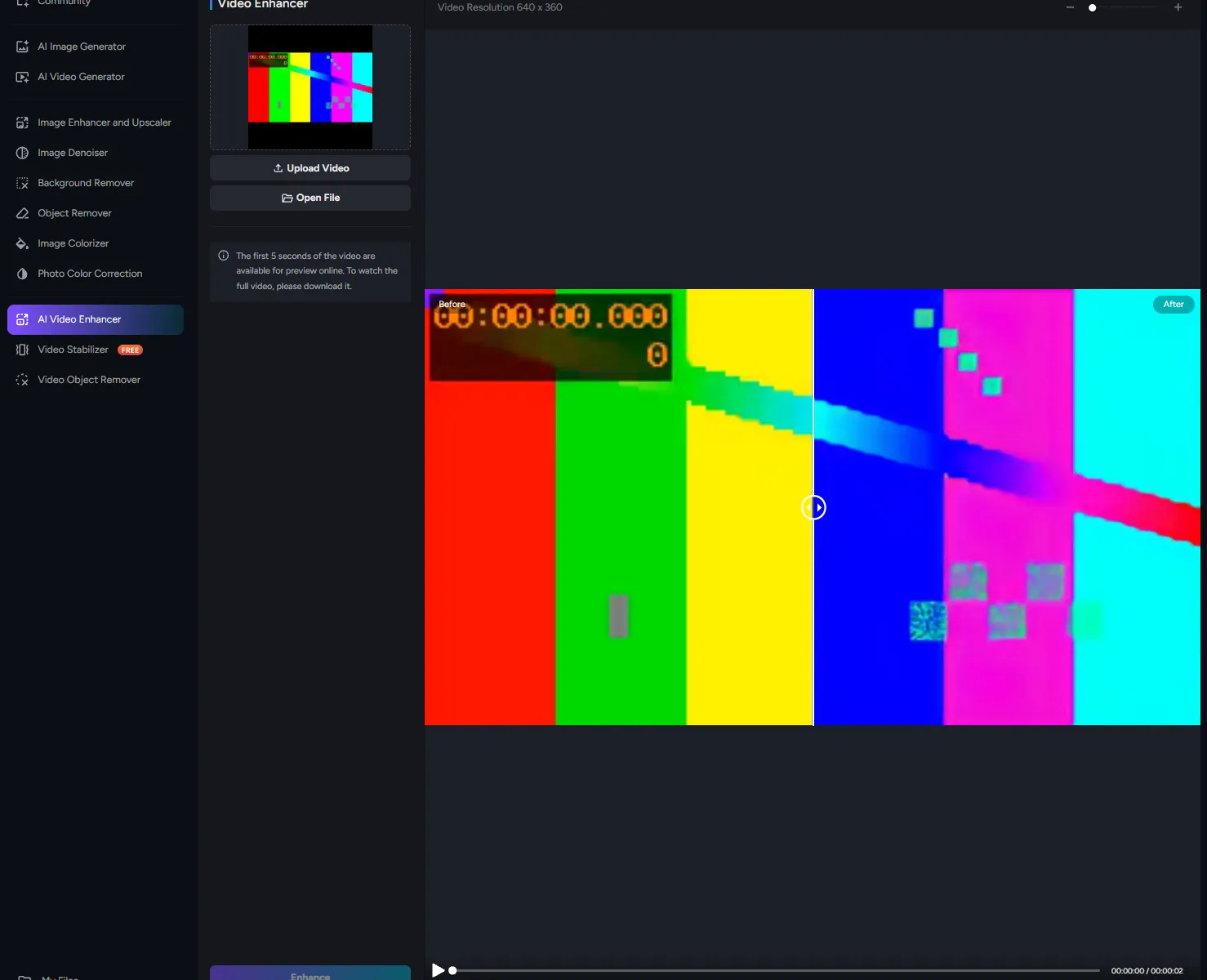
I created a local two-second video at 320×180 and uploaded it to the web Video Enhancer. The upload reached 100%. The interface showed 2 Credit, Preview(2s) and Video Resolution 320 x 180.
Pressing Enhance produced the confirmation: "You've selected 1 video(s). This will use 2 credit(s). Would you like to continue?" I confirmed. After processing, the resolution displayed as 640 x 360, with a Before/After comparison. This run doubled both dimensions.
The preview page said, "The first 5 seconds of the video are available for preview online. To watch the full video, please download it." I clicked Download, saved enhanced-video.mp4, and a local ffprobe check confirmed 640×360 and 2s. The export had no AVCLabs watermark.
I did not test longer footage, other resolutions, face detail, color quality or other noise.
Where the free tier stops
The registration wording gives the headline numbers: 20 free credits, export up to 20 times and watermark-free content for all exports. The observed job consumed two credits. I report that as the charge shown for this job, not as a universal rate for every file or setting.
The online preview is limited to the first five seconds; the full result must be downloaded. That did not block this two-second check.
Two paths were visible but not used: "Follow Us to Get 60 Credits", which required emailing social-media links to support, and "Contact Us to Get More Credits." The desktop Free Download route is also separate.
Pricing and the checkout I stopped at
The first URL I tried, /pricing.html, returned "Oops! Page Not Found." The plan details were on /purchase.html.
| Product or plan | Monthly price |
|---|---|
| Video Enhancer AI | $39.95 |
| Video Blur AI | $39.95 |
| Photo Enhancer AI | $19.95 |
| PhotoPro AI | $39.95 |
| Video Enhancer Cloud | $9.95 |
| Any Video Converter | $39.95 |
| Bundle, Video + Photo Enhancer AI | $49.95, shown from $59.95 |
| Online Editor, 100 credits | $9.95 |
| Online Editor, 300 credits | $25.95 |
| Online Editor, 500 credits | $39.95 |
| MCP Access | From $9.95 |
The Pay page also had a Pay As You Go tab, which I did not open. Subscription text said Auto-Renew. Cancel anytime; up to five months of single monthly credits can roll over. VAT was additional.
Subscribe on the first online-editor tier opened a Paddle checkout with PayPal and a card form. The form had card number, name, expiry and security-code fields, with the country defaulting to China. I entered the checkout email and continued to "或者用卡支付" and "立即订阅."
I stopped there: no card number or CVV, no click on 立即订阅, no subscription. Whether payment would succeed is untested. No overseas mobile number was demanded.
The affiliate terms and why no link
The public affiliate page says "up to 40% commission on the monthly sales amount." The Impact offer terms are more specific: the default online-sale rate is 30% USD, described as Default Payout 30% of order sale amount. The 40% figure belongs to a bonus tier at $5,000.00+ monthly sales and is described as a monthly performance bonus. I therefore treat 30% as the baseline and 40% as conditional.
The terms specify Last Click credit, a 30-day attribution window, action locking one month and 15 days after the end of the tracked month, and payment of approved transactions 25 days after the end of the month in which they locked. They do not state a minimum payout or payout method, so I am not filling those in.
The policy prohibits iFrames and pop-ups, brand-name or domain changes containing "avclabs," eBay or Amazon sales, unauthorized discounts, coupons or cashback, and branded bidding. It allows AVCLabs to remove a publisher or withhold payouts for violations. These are terms, not earnings claims.
Register Here led to an Impact campaign page. After accepting the offer and choosing Continue with Email, the form asked for email, first name, last name, password and Mobile Number. I left the mobile field empty. Continue stayed disabled, the application was not submitted and no referral link was issued. That is why this article has no affiliate or promotional link.
Who it fits
It fits:
- Someone who wants to test a short video enhancement in a browser without installing a desktop client
- A user working within 20 registration credits who wants to inspect a small result first
- Anyone who needs a downloaded file rather than an online-only preview
- Buyers comparing online-editor credit plans with separately priced desktop products
- Readers who want the 30% affiliate baseline kept separate from the conditional 40% bonus tier
It does not fit:
- Anyone expecting to watch a full result in the browser; the stated preview is only the first five seconds
- A user who needs desktop batch or offline processing as part of the tested path
- Anyone expecting a referral link from this session; the application was not completed
- Anyone looking for a working
/pricing.htmlpage, since that URL was a 404 in this session
Bottom line
AVCLabs' web route did what this test needed. A new account came with 20 free credits, no card binding and no mobile-number request. A two-second 320×180 clip cost two credits, was enhanced to 640×360, and downloaded as enhanced-video.mp4, confirmed locally at 640×360 and two seconds with no watermark.
The paid path is separate. Online-editor plans start at 100 credits for $9.95 per month, while desktop products are priced individually. Paddle checkout was reachable, but I stopped at the card form and paid nothing. The affiliate baseline is 30%, not the conditional 40%, and the Impact form's mobile-number requirement left the application unsubmitted. No link, payment or earnings claim is attached to this review.